반응형
Notice
Recent Posts
Recent Comments
Link
| 일 | 월 | 화 | 수 | 목 | 금 | 토 |
|---|---|---|---|---|---|---|
| 1 | 2 | 3 | 4 | 5 | 6 | |
| 7 | 8 | 9 | 10 | 11 | 12 | 13 |
| 14 | 15 | 16 | 17 | 18 | 19 | 20 |
| 21 | 22 | 23 | 24 | 25 | 26 | 27 |
| 28 | 29 | 30 |
Tags
- 남성영양제
- 해외여행
- 쿠팡아이템
- 베트남도시
- 여행가보고서
- 디자인
- 여행정보
- 일본여행
- 커플해외여행지추천
- 가까운해외여행지
- 보라카이여행
- 커플해외여행
- 꽃개화시기
- 디자인사이트
- 여행
- 베트남여행
- 곤약냉모밀
- 캐리어브랜드
- 오블완
- 보라카이날씨
- 동남아여행지추천
- 국내라면
- 보라카이
- 티스토리챌린지
- 애견동반
- N잡러
- 여자향수추천
- 나트랑숙소
- 가성비여행지
- 해외여행지추천
Archives
- Today
- Total
숨은 꿀팁 저장소
청첩장용 웨딩 일러스트 ai 프롬프트 작성법 본문
반응형
웨딩사진을 청첩장용 일러스트로 변경하는 프롬포트는
Chat GPT와 구글 제미나이 무료 버전으로도 가능하며,
AI에 따라 조금씩 다르게 나올 수 있으니,
아래 이미지 확인하시고 원하는 버전으로 만드세요!
다른 AI에도 적용이 가능하지만 조금 다르게 나올 수 있습니다.
1. 깔끔한 라인 웨딩사진 일러스트 만들기
Chat GPT 버전
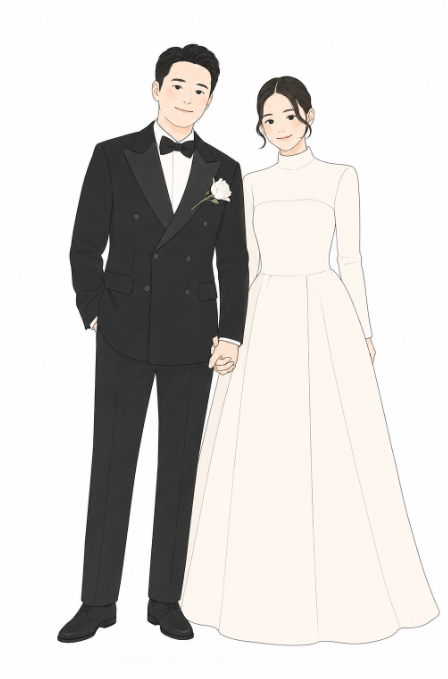

프롬프트로 생성 후에 표정을 바꿔달라고 하면, 왼쪽 이미지처럼 웃는 표정으로도 변경할 수 있습니다.
구글 Gemini 버전

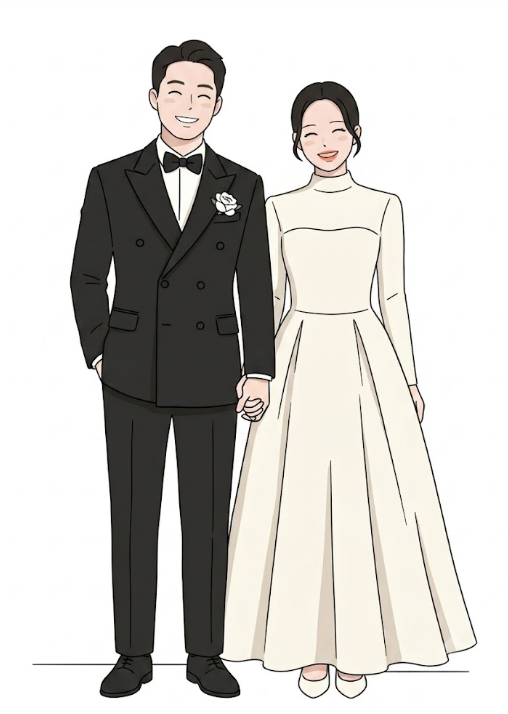
Convert this photo into a simple Korean webtoon-style couple illustration.
[LINE ART]
- Very thin, minimal black outlines (0.5-1px)
- Simple clean lines only — no detailed textures, no fabric patterns, no wrinkles
- Clothing drawn with basic flat shapes and gentle fold lines only
[FACE & SKIN]
- Extremely simplified, clean facial features
- Small, simple eyes (NOT large anime eyes) — natural-sized, gentle expression
- Minimal facial details: just eyes, nose dot, and a soft smile line
- NO wrinkles, NO pores, NO detailed shading on face
- Very subtle, barely-visible blush on cheeks (optional, very light)
- Smooth flat skin tone
[SHADING & COLOR]
- Minimal shading — flat color with only 1 very soft shadow layer
- Clothing in simple flat colors matching the photo
- NO patterns, NO lace detail, NO fabric texture rendering
[COMPOSITION]
- Full body, head to toe
- Match original pose naturally
-Couple standing side by side, relaxed and elegant
[BACKGROUND]
- Pure white background, nothing else [STYLE REFERENCE]
- Like a simple Korean wedding illustration card
- Clean, minimal, elegant — NOT detailed anime, NOT realistic
- Think: simple line drawing with light color fill, like a greeting card illustration
2. 수채화 느낌 웨딩사진 일러스트 만들기
Chat GPT 버전 / 구글 Gemini 버전

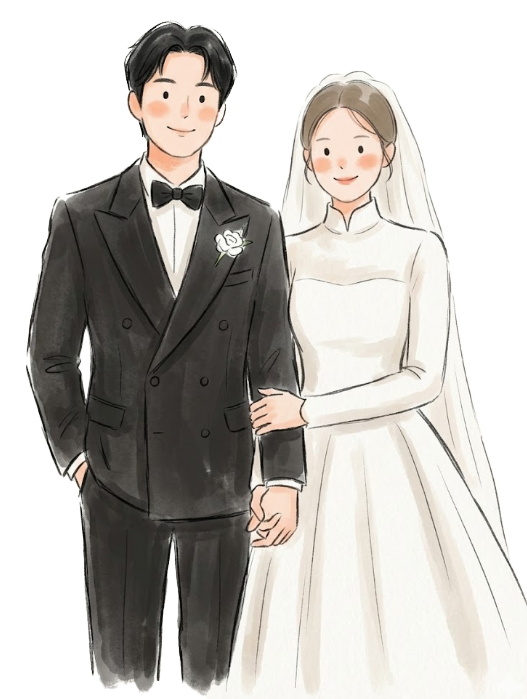
Convert this photo into a soft Korean digital illustration in a hand-drawn watercolor-sketch style.
[OVERALL STYLE]
- Soft digital painting with a hand-drawn, slightly loose brushstroke feel
- Mix of sketch lines and light watercolor-style color fills
- Warm, romantic, greeting-card illustration aesthetic
- NOT anime, NOT clean vector — loose and painterly
[LINE ART]
- Lines are confident but not perfectly smooth — slight sketch imperfection is intentional
- Visible brushstroke texture on clothing and hair edges
[FACE]
- Very minimal, cute facial features
- Tiny simple eyes with a gentle closed or half-smile expression
- Just a small nose hint and a soft curved smile line
- Light peachy-pink blush on cheeks, soft and diffused
- NO detailed eyes, NO eyelashes detail, NO realistic features
[HAIR]
- Drawn with loose flowing lines
- Simple color block with a few highlight strokes only
- Natural hair movement suggested, not detailed strand by strand
[CLOTHING & BODY]
- Flat base color with soft brush shading for volume (1-2 shadow tones)
- NO fabric patterns, NO lace detail, NO texture rendering
- Clothing colors match the original photo exactly
- Soft folds suggested by simple shadow shapes only [COMPOSITION]
- Full body illustration, head to toe
- Couple standing side by side, naturally posed
- Relaxed, warm body language
[BACKGROUND]
- white background
- No detailed background scenery
[COLOR PALETTE]
- Soft, slightly muted and warm tones overall
- Clothing colors faithful to the photo
- Skin tone: warm peachy beige, flat and smooth
3. 내가 원하는 느낌에 웨딩 일러스트 만들기
가장 비슷한 스타일이 나오도록 위에 프롬프트는 영어르 드렸지만,
한글로 작성해도 이미지 생성은 가능합니다.
다만 조금 더 원하는 스타일로 제작하고 싶다면,
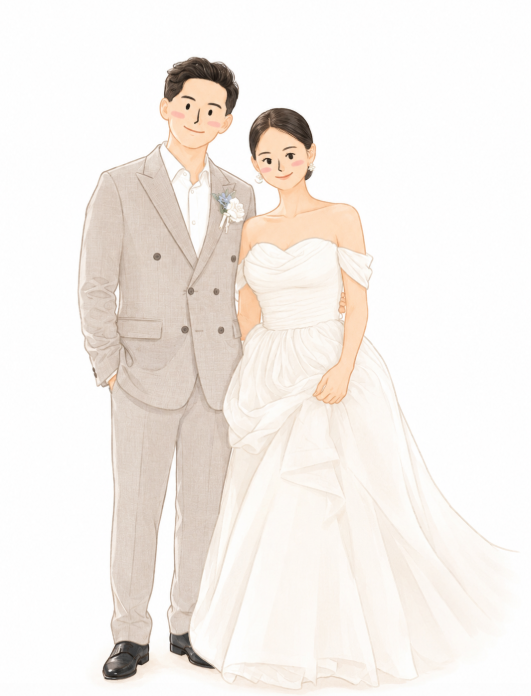
아래 프롬프트를 참고해서 내 사진(첫번째)과 예시이미지(두번째)를 같이 넣어주세요.
배경없이도 가능하지만, 배경 스타일을 그대로 살려서 일러스트를 만드는 것도 가능해요.
아래 프롬포트에서 배경은 그대로 그려달라고 명령하셔도 괜찮습니다.
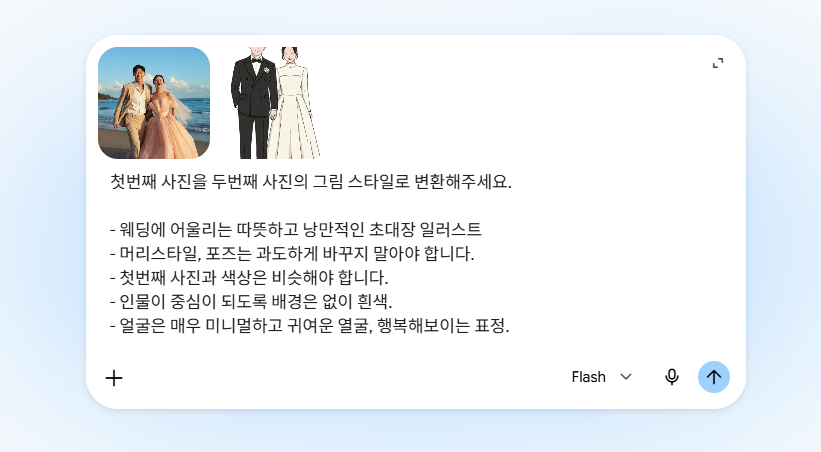


첫번째 사진을 두번째 사진의 그림 스타일로 변환해주세요.
- 웨딩에 어울리는 따뜻하고 낭만적인 초대장 일러스트
- 머리스타일, 포즈는 과도하게 바꾸지 말아야 합니다.
- 첫번째 사진과 색상은 비슷해야 합니다.
- 인물이 중심이 되도록 배경은 없이 흰색.
- 얼굴은 매우 미니멀하고 귀여운 열굴, 행복해보이는 표정.
다양하게 활용할 수 있도록 예시 이미지도 남겨둡니다!
크레파스 느낌, 물감 느낌, 테두리없이 등 조금 더 디테일한 프롬프트일 경우
원하는 결과물을 얻기 좋으며, 마음에 들지 않을 경우 재 작업을 요청하는 것보다
새롭게 시작하는 것이 좋습니다. 예쁜 웨딩하세요!

반응형